
Having trouble accessing the Media Library? Start with the issue that matches what you're experiencing. In most cases, you can get back in by checking your activation email or resetting your password.
Didn't receive the activation email
If you haven’t received your activation email:
- Check your Spam, Junk, or Promotions folder.
- Search your inbox for the activation email.
- Make sure you're checking the email address used when your Media Library access was requested.
- Wait a few minutes in case of a delivery delay.
If you still can't find the email, contact your Easia Travel representative or email digitalmarketing@easia-travel.com.
Activation link has expired
Activation links are valid for 48 hours. If your link has expired, contact your Easia Travel representative or email digitalmarketing@easia-travel.com to request a new activation email. Include the email address you used to request access.
Can't log in
If you've already activated your account but can't sign in:
- Make sure you're using the email address linked to your Media Library account.
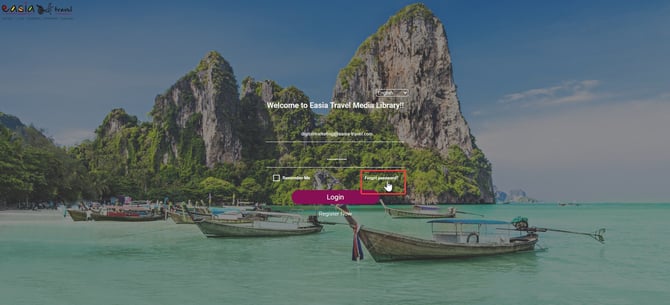
- Select Forgot password? if you don't remember your password.
- Follow the instructions in the password reset email.
- Try signing in again.
Still need help?
If you've tried the steps above and still can't access the Media Library, contact your Easia Travel representative or email digitalmarketing@easia-travel.com.
When you contact Easia Travel, include the email address associated with your Media Library account and a brief description of the issue.
Best practices
- Activate your Media Library access as soon as you receive the activation email.
- Always sign in with the email address linked to your Media Library account.
- Keep your login details private and never share your password by email.
Tip: If you have already activated your account and can’t sign in, select Forgot password? first. A password reset may get you back into the Media Library without further assistance.
What's next?
Having trouble with something other than account access? Learn how to resolve common search, download, and sharing issues.
→ Next article: Fix Search, Download & Sharing Issues