
Whether you’re building a website, brochure, proposal, or campaign, this article shows you how to search the Media Library so you spend less time searching and more time working with the right visuals.
Overview
Looking for a destination, hotel, activity, attraction, or marketing visual? You can search using keywords and metadata, or use AI Visual Search to describe the image you have in mind. Choosing the right search method will help you find relevant images faster.
Search using keywords
Enter one or more keywords into the search bar. You can search by:
- Destination
- Hotel name
- Attraction
- Activity or experience
- Food and beverage
- Theme
- Product name (when known)
The more clearly your search reflects your marketing need, the faster you'll find strong visuals.
| Instead of | Try |
| Thailand | Phuket beach |
| Hotel | Trisara Phuket |
| Food | Hanoi street food |
| Temple | Angkor Wat sunrise |
Search with AI Visual Search
AI Visual Search helps you find images based on what is visually shown in them, even when the exact words are not included in the file name or metadata.
To use it:
- Enter a description of the image you are looking for in the Search bar.
- Make sure AI Enabled is turned on.
- Describe the visual as naturally and specifically as possible.
| Instead of | Try |
|---|---|
| River | Wide scenic river surrounded by green mountains |
| Boat | Local boat travelling on a river |
| Hotel | Luxury resort surrounded by tropical gardens |
| Food | Local people preparing traditional food |
| Beach | White sandy beach with clear blue water |
| Market | Busy local market with fresh produce and local vendors |
Tip: Be descriptive. Include the subject, activity, setting or atmosphere you want to see. AI Visual Search works best with a clear visual description rather than a single general keyword. AI Search does not replace filters or asset information. For criteria such as Country, Brand, Usage Rights or Best Of, always use the available Media Library filters.
Search by marketing need
| You're creating... | Try searching for... |
| A destination page | "Vietnam landscape", "Cambodia temples" |
| A brochure | "[destination] hero image", "[destination] culture" |
| A proposal | "[hotel name]", "[destination] luxury" |
| A social post | "[destination] sunset", "[experience] lifestyle" |
Search using quotation marks
When you know the exact name or phrase, use standard keyword search rather than AI Search. This tells the Media Library to search for the complete phrase rather than the individual words - especially useful for hotel names, product names, and multi-word destinations.
| Search | Result |
| "Halong Bay" | Finds images containing the exact phrase "Halong Bay". |
| Halong Bay | Returns broader results related to both "Halong" and "Bay". |
Tip: Try quotation marks first when you need a precise, well-known name. You’ll cut through irrelevant results faster.
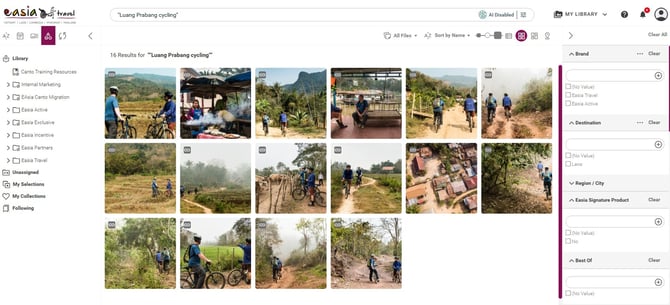
Search using metadata
You don't always need to know the exact image name. Searching with relevant metadata can help you find related images, including:
- Product name
- Destination
- Brand
- Segment
- Content type
- Tags and keywords
AI Search complements metadata search; it does not replace it. Use metadata and filters when you need Easia-specific information such as Brand, Country, Usage Rights or other classifications.
Find images selected by Marketing with "Best Of"
If you need a quick selection of recommended images for a specific country, search for the country first, then select Best Of from the Filters
- Search for the country you need.
- Open Filters.
- Under Filters, select Best Of .
- Review the images already selected by the Easia Travel Marketing team for that country.
Best Of is useful when you need a reliable selection of country imagery without having to review the full set of search results. These curated images are particularly useful for presentations, decoration, and other general marketing needs.
If your first search doesn't work
Before contacting support, try broadening your search:
- If a keyword search is too broad, add a specific hotel, product, or destination name.
- If you are looking for a type of visual rather than a specific asset, turn on AI Enabled and describe what you want to see.
- If an AI search is too broad, add more visual details such as the setting, activity, subject or atmosphere.
- Remove quotation marks and search again if you do not need an exact phrase.
- Clear any active filters, then search again.
Best practices
- For general country imagery, search for the country first and apply the Best Of filter to see images selected by Marketing.
- Combine a destination with an activity or experience for more targeted results.
- Use quotation marks for exact names.
- Try alternative or broader keywords if your first search comes up short.
Tip: Pairing a destination with a mood or activity (“Luang Prabang sunrise,” “Chiang Mai wellness”) usually surfaces more usable, on-brand imagery than a single broad keyword.
What's next?
Once you have a set of results, narrow them down with filters.
→ Next article: Refine Your Results with Filters