
Overview
Before publishing an image, check who owns it and what usage conditions apply. These details appear in the image's **Digital Rights Management** information.
Review these three fields together:
- Terms & Conditions: what you are allowed to do with the image.
- Copyright: who owns the image, and whether a credit is required.
- Photographer / License: background information about the source of the image. This field does not decide whether a credit is required.
Depending on the image, you may use it freely, or you may need to display a credit under it.
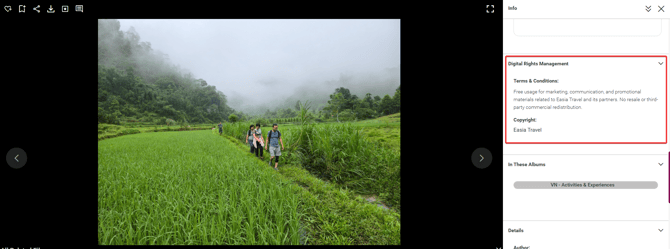
Copyright: Easia Travel
If the Copyright field shows Easia Travel, you can use the image freely for the purposes stated in the Terms & Conditions. You do not need to add a credit, trademark, or copyright line under the image.
A photographer may still be listed under Photographer / License. This does not change the permitted usage or create a credit requirement.
Important: Free usage does not mean unrestricted use. Always follow the Terms & Conditions shown for the individual image, such as the restriction on resale or third-party commercial redistribution.
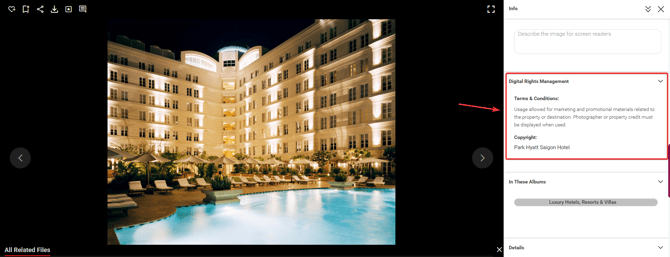
Copyright: Partner
If the Copyright field shows a partner or property name, display that name as a copyright line under the image whenever you publish it. Follow the Terms & Conditions shown for the image.
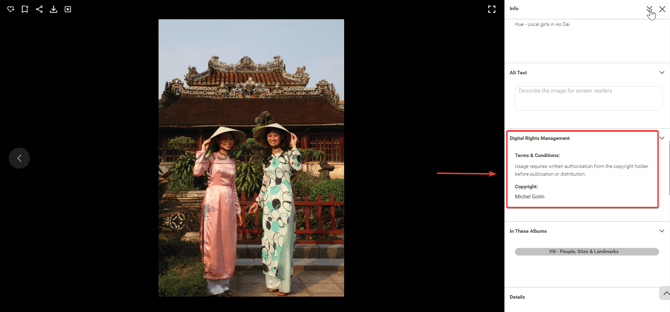
Copyright: Photographer
If the Copyright field shows a photographer’s name, display that name as a copyright line under the image whenever you publish it. Follow the Terms & Conditions shown for the image.
Copyright & licensing quick reference
| Copyright | Credit under the image? | What you should do |
|---|---|---|
| Easia Travel | No | Use the image for the purposes stated in the Terms & Conditions. No credit, trademark, or copyright line is required. |
| Partner | Yes | Display the partner name shown in the Copyright field under the image. |
| Photographer | Yes | Display the photographer name shown in the Copyright field under the image. |
Important: Always check the Terms & Conditions for the individual image before using it. They tell you what you are allowed to do.
Sample attribution formats
When a credit is required, display the name shown in the Copyright field, for example:
- “© [Name shown in the Copyright field]”
Where to place credits
When a credit is required, place it where it is clearly visible and associated with the image. Depending on the channel, this may be an image caption, a page or document footer, a dedicated image credits page, or a social media caption.
Best practices
- Review Terms & Conditions, Copyright, and Photographer / License together, not in isolation.
- Follow the usage conditions shown for the individual image.
- Display a credit whenever the Copyright field shows a partner or photographer name.
- Remember that cropping, resizing, or otherwise modifying an image does not remove its usage or credit requirements.
Tip: Copyright decides whether you must credit the image, Terms & Conditions define how you may use it, and Photographer / License is background information only.
What's next?
If you're having trouble accessing the Media Library or need help with your account, start with the troubleshooting guide.
→ Next article: Get Back Into the Media Library